Watch: the Networking page
Attaching a workload to a vSwitch VLAN, creating a LAN bridge, and edge exposure. The written steps are below.
Overview
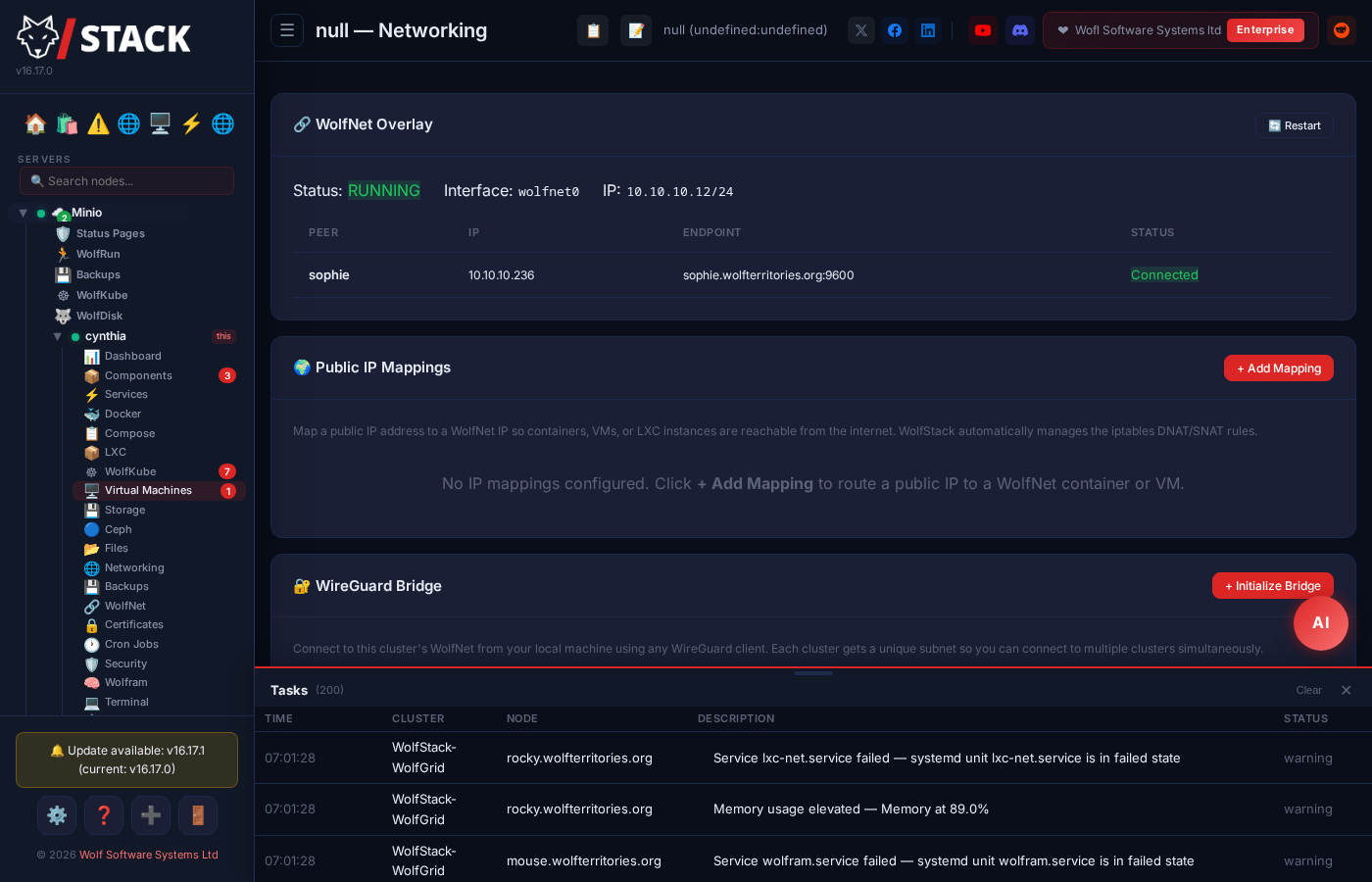
WolfStack includes comprehensive networking tools for managing IPs, WolfNet mesh connections, VLANs, routed public IPs, container networking, and integration with cloud edge load balancers.
Global WolfNet
The Global WolfNet view shows all WolfNet IPs and peer connections across your entire infrastructure. See which IPs belong to nodes, LXC containers, Docker containers, and VMs at a glance.
Container Networking
- Each LXC container gets a bridge IP on
lxcbr0for local communication - WolfNet IPs (10.10.10.x) enable encrypted cross-node communication
- Automatic route management — containers can ping each other across nodes
- VIP (Virtual IP) support for load balancing
Docker DNS & Outbound Self-Heal New in v24.37
On hosts using systemd-resolved, Docker famously copies the unreachable 127.0.0.53 stub resolver into containers and they lose DNS. WolfStack detects the host's real upstream nameservers, writes them into Docker's daemon.json, and continuously re-checks that every Docker bridge network has working NAT and forwarding rules — healing them if a firewall reload wipes them. Containers just keep resolving and reaching the internet; nothing to configure.
WolfNet Mesh
WolfNet creates an encrypted mesh network between all your nodes automatically. Uses X25519 + ChaCha20-Poly1305 encryption (WireGuard-class). Works even if machines are on different networks or behind NAT. Each cluster runs its own mesh: WolfNet IP allocation and start-time conflict checks are scoped to the cluster, so separate clusters can reuse the same address space without tripping over each other.
Provider-agnostic vSwitch (VLAN + routed public IPs)
Bring up VLANs and routed public IP subnets directly from the dashboard, with persistence across reboots on whatever Linux distro you’re running.
- VLAN management — Create, edit, and remove 802.1Q VLANs on any host interface. Per-VLAN IP / netmask / gateway / MTU. Validated against existing routes so you don’t accidentally black-hole the management interface.
- Routed public IP subnets — Attach an additional public /29 or larger subnet to a host (Hetzner vSwitch, OVH additional IPs, DigitalOcean reserved IPs) and route it to containers / VMs. WolfStack handles the gateway, ARP / NDP proxying, and per-distro persistence.
- Multi-distro persistence — Writes
/etc/network/interfaces.d/on Debian/Ubuntu,/etc/sysconfig/network-scripts/on RHEL/Rocky,systemd-networkddrop-ins on Arch / openSUSE / Alpine. Same UI, right config for your distro. - Pre-flight safety — Validates VLAN ID range, subnet collisions, gateway reachability, and MTU consistency before applying. Refuses changes that would brick the management interface.
- VLAN import — Discover existing local VLAN configuration with one click, or paste a config from another server to replicate it. Useful when standardising VLANs across a new node.
Attaching containers & VMs to a vSwitch
Once a VLAN exists, any LXC container, Docker container, or VM can join it — and for containers and VMs you can do the whole thing from the workload’s own network settings, without visiting the Networking page first.
Quick steps (LXC container)
- Open the container’s Settings → Network tab and edit its interface.
- Choose a vSwitch uplink NIC from the dropdown and enter the VLAN ID your provider assigned (for a Hetzner vSwitch, the 4000–4091 tag from Robot → vSwitches).
- Leave the bridge field blank; fill in the container’s IP and gateway as normal.
- Click Save. WolfStack builds the tagged sub-interface and bridge for you and attaches the container — restart the container to apply.
What happens under the hood
In an LXC container’s network-interface editor, choose a vSwitch uplink NIC from the dropdown and enter the VLAN ID your provider assigned (for a Hetzner vSwitch, the 4000–4091 tag from Robot → vSwitches). Leave the bridge field blank and fill in the container’s IP and gateway as usual. On save, WolfStack:
- creates the tagged sub-interface (
<uplink>.<vlan>, e.g.enp6s0.4000) and a bridge (vmbr<vlan>) if they don’t already exist; - attaches the container to that bridge — the 802.1Q tag rides on the sub-interface, so the container itself carries no tag;
- reuses the existing sub-interface and bridge when another workload is already on that VLAN.
L2-only bridges (no host IP)
A vSwitch bridge does not have to carry a host address. Leave the subnet and host IP blank to create a pure Layer-2 bridge — the host simply switches the VLAN and only the guests on it hold addresses. This is the natural fit for a public-IP subnet routed to a vSwitch, where the public addresses belong to the containers and VMs rather than the host.
VMs on a vSwitch
Virtual machines join a vSwitch the same way. Because a VM’s address lives inside the guest OS, WolfStack stages it through cloud-init — qm set --ipconfigN on Proxmox VMs (adding a cloud-init drive if the VM lacks one), or a NoCloud seed ISO for libvirt VMs — and the guest applies it on its next boot. The attach dialog includes a per-VM “reboot now” option so the address can take effect immediately or on your own schedule.
The model — a bridge per VLAN
WolfStack uses a dedicated bridge per VLAN: the 802.1Q tagging happens on the sub-interface and the bridge is a plain Layer-2 bridge. This keeps the host’s primary NIC untouched — no risk of locking yourself out — and means a workload joins a VLAN simply by attaching to its bridge. Proxmox-style VLAN-aware bridges (one bridge, per-port tags) continue to work unchanged for imported Proxmox containers and VMs.
Edge integration (Cloud LBs + Cloudflare Tunnel)
WolfStack’s HTTP proxy supports four edge strategies for exposing services to the public internet, picked per site:
- Direct (port forward) — Default. Your firewall forwards 80/443 to the WolfStack node.
- Hetzner Cloud Load Balancer — WolfStack provisions a Hetzner LB pointing at your nodes, configures health checks, and tears it down when no longer needed.
- DigitalOcean Load Balancer — Same flow on DO; provisions, monitors, and reaps the LB when the site is removed.
- Cloudflare Tunnel — Zero-port-forward exposure via
cloudflared. Provisions a named tunnel, configures the DNS, and tears down when the site is removed.
Credentials for each provider are stored under Settings → Cloud Providers, XOR-obfuscated at rest, never returned to the browser. Auto-teardown prevents orphan resources from racking up cloud bills.
Creating a LAN bridge
Putting a container or VM on your actual LAN needs a bridge that enslaves a physical NIC. WolfStack can create one for you, and — just as usefully — tells you which of your existing bridges will actually do what you want.
- Bridges are classified LAN vs NAT in the LXC and VM bridge pickers, with a warning on NAT bridges. Attaching a workload to a NAT bridge when you wanted it on the LAN is a classic silent mistake; the picker now names the difference.
- Auto-create across every network stack — NetworkManager, systemd-networkd and ifupdown are all handled, so the same button works regardless of how the host manages its interfaces.
- The management NIC is refused by default. Enslaving the interface you are connected over is how people lock themselves out of a remote machine.
- Opt-in with a safety net. If you deliberately choose the management NIC, the change runs under a 90-second commit-confirm — it auto-reverts unless you confirm connectivity survived. Get it wrong and the host comes back on its own rather than needing a hands-on rescue.
Bringing a NIC up — and keeping it up New in v25.15
Bringing an interface up from the Networking page is now an intent, not a one-off. A NIC that no network manager owns — the typical case is a USB adapter added after install, with no /etc/network/interfaces stanza, no .network file, and no NetworkManager connection — used to be down again after every reboot.
- When you bring a NIC up in the UI, WolfStack records the intent in its own store (
/etc/wolfstack/nic-links.json) and brings it up again after every boot. The confirmation message tells you so. - The boot task retries for a few minutes, so USB NICs that enumerate after the service starts are still caught.
- The record is keyed on hardware identity, not just the interface name. Many USB adapters have no burned-in MAC and present a random one each boot — which changes their
enx…name every reboot. WolfStack also stores the adapter’s USB port path and permanent MAC, re-matches the device under its new name at boot, and updates the record. - This works identically whatever manages the host’s networking — ifupdown, systemd-networkd, NetworkManager, netplan, or nothing at all — and never fights another manager, since a link-up is idempotent.
- Bringing the NIC down in the UI removes the record and returns the interface to whatever the system’s own configuration does. WolfStack never enforces down-at-boot — that would fight a config that legitimately brings the NIC up.
Note this persists the link state only. An IP address assigned through WolfStack is persisted separately through the host’s own network manager configuration.
IPv6 support
WolfStack can be managed over IPv6, and can route IPv6 workload subnets across a WolfNet mesh. Both are opt-in: the default bind address is still 0.0.0.0 and IPv6 subnet routing ships switched off, so a pure-IPv4 install behaves exactly as it always has.
Managing WolfStack over IPv6
- Dual-stack bind.
--bind ::serves the dashboard and API over IPv6. Node and peer addresses are stored bare and bracketed only when a URL or bind string is built, so IPv4 addresses and hostnames pass through byte-identically. - Address classification is IPv6-aware. Unique local addresses (
fc00::/7) are treated as private, and link-local (fe80::/10) is rejected as an advertised cluster address — a link-local address is not reachable from another node and must never be published as though it were. - Security parity, not just reachability. Workload blocking is dual-stack, the stale-rule sweep heals
ip6tablesrules as well asiptables, and the threat-intelligence IPv6 blocklist is enforced through a companion ruleset applied alongside the IPv4 firewall. That companion never declares the built-in chains, so your ownip6tablesrules survive. - IPv4-mapped addresses are canonicalised. A client arriving as
::ffff:a.b.c.don a dual-stack socket is resolved back to its real IPv4 identity at every security decision, so the brute-force blocker and trusted-IP allowlist act in the correct table instead of writing a rule that does nothing.
IPv6 subnet routing
IPv6 workload subnets ride the existing IPv4 overlay rather than requiring a second mesh. A route’s gateway remains the peer’s IPv4 WolfNet address; the consuming node installs a device route, WolfNet maps the IPv6 CIDR to the correct gateway peer, and the gateway performs NAT66 with IPv6 forwarding.
ip -6 route add <cidr> dev wolfnet0
- Default off. Gated behind a master configuration flag so every existing configuration and every fresh install loads with it disabled — nothing IPv6-related executes on any node until you opt in.
- Capability gated. On hosts with IPv6 disabled the whole path cleanly does nothing rather than erroring.
- The IPv4 path is untouched. Every IPv6 branch sits behind an explicit check, protected by a regression test asserting the IPv4 behaviour is unchanged.
- Requires WolfNet 0.5.28 or later for the data plane.
IPv6 subnet routing ships deliberately conservative — default-off, for field testing against real IPv6 overlays. The management-plane IPv6 support has been runtime-tested on a dual-stack host.