Overview
WolfFunctions is WolfStack’s built-in serverless / functions-as-a-service platform. Instead of provisioning an LXC, Docker container, or VM, you write (or have AI generate) a small handler function, and WolfStack keeps warm, sandboxed copies of it running across your cluster nodes. Any node can serve an invocation, and losing a node changes nothing — the function definition is replicated everywhere and warm copies are automatically re-placed.
It is the self-hosted equivalent of AWS Lambda or Google Cloud Functions, built directly into the WolfStack binary with zero external dependencies — no cloud account, no separate control plane.
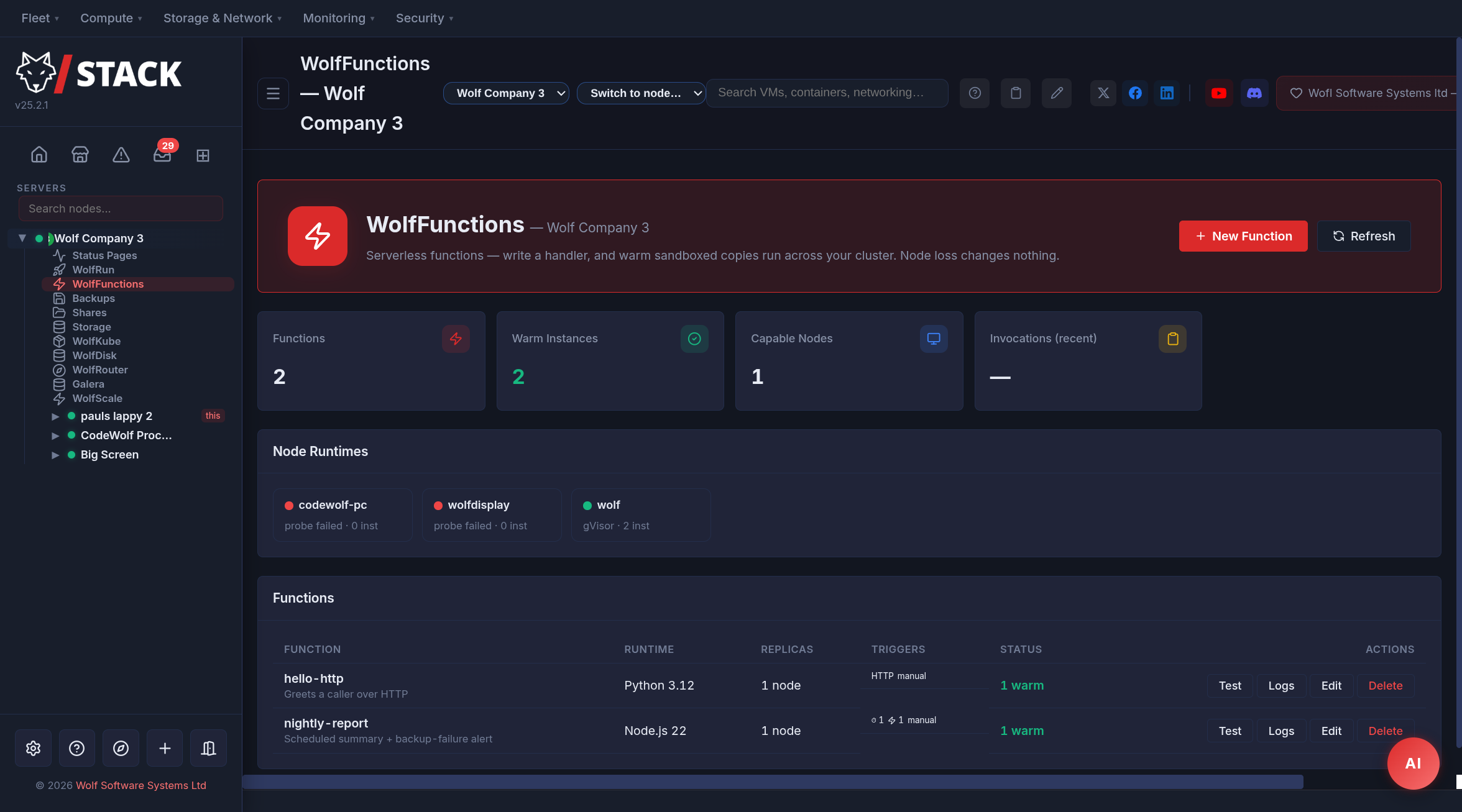
Key Features
- Strong isolation — every function runs inside a gVisor sandbox (the same userspace-kernel isolation Google Cloud Functions uses), not a bare process. A misbehaving function can’t reach the host kernel.
- Runs anywhere — gVisor’s
runscis a single static binary that needs no hardware virtualization, so functions work on cloud VMs and VPS instances where KVM isn’t available. A Docker execution fallback covers nodes whererunsccan’t run (clearly labelled as reduced isolation). - Warm by default — configurable provisioned concurrency keeps instances hot, so invocations don’t pay a cold start. Optional scale-to-zero for rarely-used functions.
- Cluster-wide HA — function definitions replicate to every node; the cluster leader places warm replicas across nodes. If a node fails, other nodes keep serving and the leader re-places.
- Multiple runtimes — Python 3.12 and Node.js 22, with the runtime layer built so more can be added.
- Triggers — an authenticated invoke API, an optional public HTTP URL per function, cron-style schedules, and thirteen internal WolfStack events (alerts, node up/down, backups, monitor state changes, container failover and image updates, UPS power events).
- Create with AI — describe what the function should do and the configured AI assistant drafts the handler for you to review before deploying.
- Per-function limits — memory, timeout, replica count, and max concurrency per node, all Lambda-style.
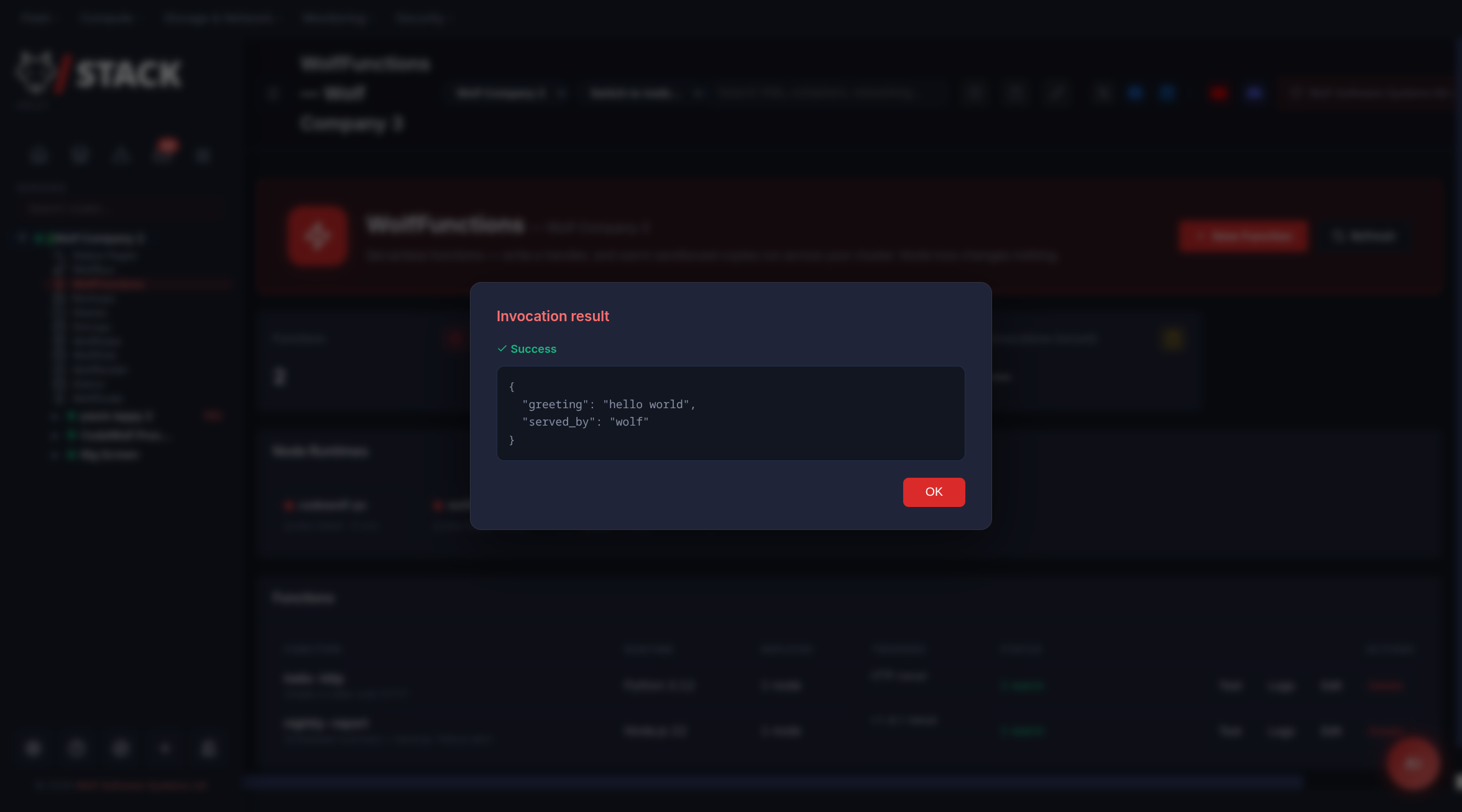
- Live testing & logs — test-invoke from the UI and see each invocation’s result, duration, and captured
print/console.logoutput.
How WolfFunctions Works
Each function is a single handler file. In Python:
def handler(event, context):
    # event   = the trigger payload (dict, or None)
    # context = { function, version, memory_mb, node, trigger }
    return {"greeting": f"hello {event.get('name', 'world')}"}
In Node.js:
exports.handler = async (event, context) => {
    return { greeting: `hello ${event?.name ?? 'world'}` };
};
When a function is invoked, WolfStack claims a warm sandbox on the serving node (or cold-starts one), passes it the event over the node’s loopback, and returns the handler’s JSON result. Each sandbox handles one request at a time (Lambda semantics); concurrent invocations burst extra sandboxes up to the per-node limit and idle ones are reaped.
Cluster model
WolfFunctions uses the same leaderless replication as WolfStack’s status pages: every node holds the full set of function definitions, and changes are broadcast to same-cluster peers. The cluster leader (lowest node ID among online nodes) runs a reconciliation loop that:
- Places replicas — picks the healthiest nodes (by load) to keep a warm copy of each function, honouring its replica count.
- Warms instances — every node ensures a warm sandbox exists for each function placed on it.
- Fires schedules — invokes functions whose interval has elapsed.
- Re-places on failure — when a node goes offline, its functions are re-placed onto surviving nodes.
Invocation routing: a node serves a function locally if it holds a warm copy, otherwise it forwards to a node that does; if every placed node is unreachable mid-failover, it cold-starts locally so the call still succeeds.
Creating a Function
Open the WolfFunctions page under a cluster in the sidebar and click New Function.
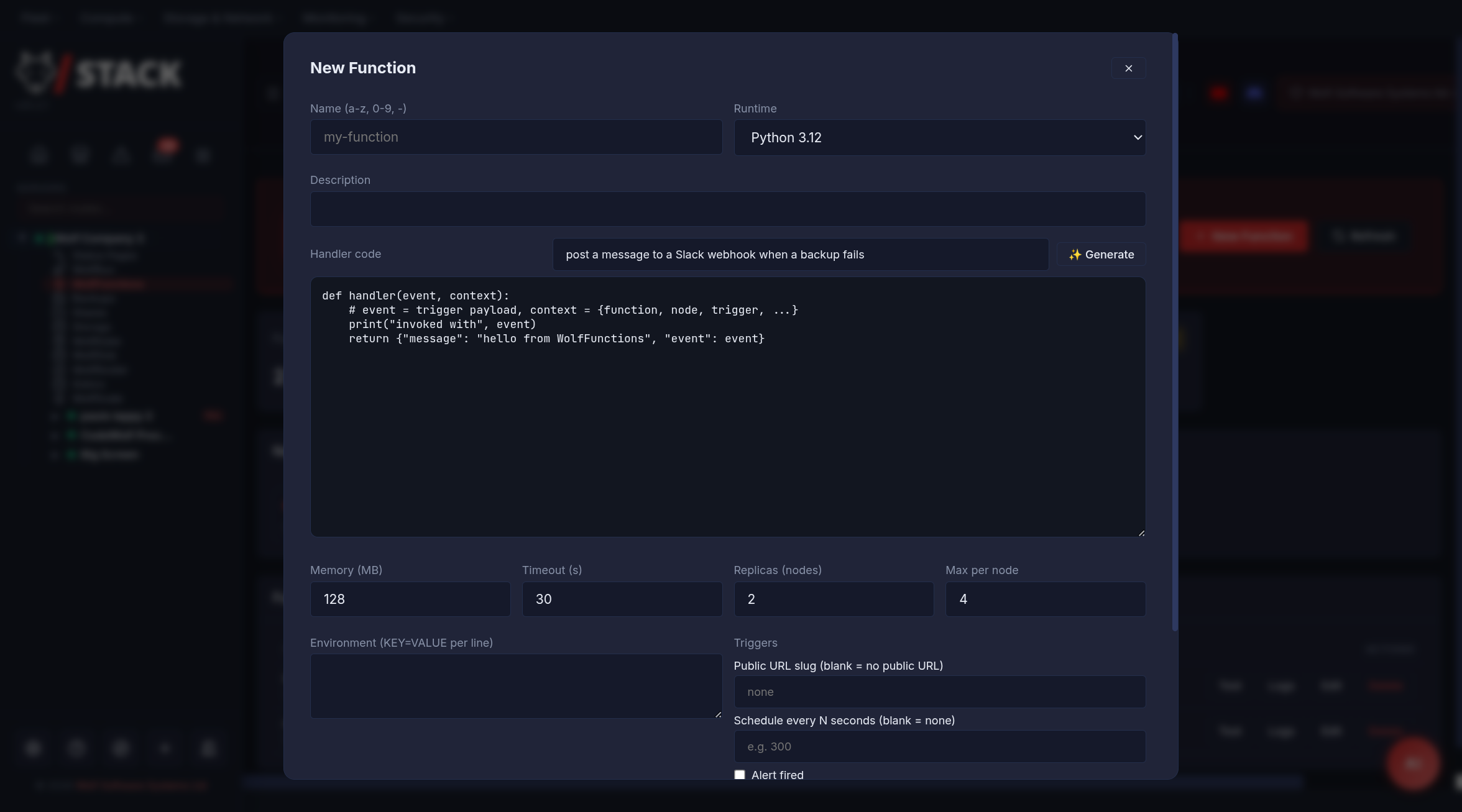
- Enter a name (lowercase letters, digits, and hyphens).
- Pick a runtime (Python 3.12 or Node.js 22).
- Write the handler in the code editor — or type a description into the Generate box and let AI draft it for you to review.
- Set memory (MB), timeout (seconds), replicas (how many nodes keep a warm copy), and max per node (burst concurrency).
- Optionally add environment variables (
KEY=VALUEper line), a public URL slug, a schedule, and event triggers. - Click Create, then Test to invoke it.
Triggers
- Manual / API —
POST /api/wolffunctions/<id>/invokewith the event as the JSON body (authenticated). - Public HTTP — give the function a slug and it’s reachable, no auth, at
/fn/<slug>. This is opt-in per function and rate-limited; the handler receives the method, query string, body, and source IP. - Schedule — run every N seconds (minimum 60).
- Events — run on internal WolfStack events. Thirteen are available:
alert_fired— any WolfStack alert was raised.node_offline/node_online— a cluster node went down or came back.backup_completed/backup_failed— a backup job finished or failed.monitor_down/monitor_up— a status-page monitor entered Down (3 consecutive failures) or recovered.container_failover— WolfRun promoted a standby after an instance failed.container_updated/container_update_failed— the image watcher recreated a container on a new image digest, or the update attempt failed / rolled back.ups_on_battery/ups_online/ups_stage_fired— UPS Power events: mains lost, mains restored, or a staged-shutdown threshold fired (payload names the stage percentage and its actions).
Using WolfFunctions in the real world
The most common use is a public JSON API: you give a function a public slug and it becomes callable over HTTP with no authentication. Whatever your handler returns is sent straight back as the JSON response body. That makes WolfFunctions a fast way to stand up webhooks, small APIs, form handlers, and glue endpoints without deploying a server or wiring up a framework.
Exposing a function as a web API
Set a Public URL slug on the function (say convert). It is then callable at:
https://<node>:8553/fn/convert- WolfStack serves HTTPS on port 8553 by default (a self-signed certificate until you issue a real one from the Certificates page, or terminate TLS at a reverse proxy).
- Both
GETandPOSTare accepted. Your handler’seventcontainsmethod,query(the raw query string),body(parsed JSON when the request sent JSON, otherwise the raw text), andsource_ip. - The handler’s return value is sent back as an
application/json200response. A handler error returns a generic500(details stay in the invocation log, never leaked to the caller); an unknown or disabled slug returns404. - Each node rate-limits a slug to 60 requests/minute.
Note: the response is plain JSON with no CORS headers, so it is ideal for server-to-server calls, webhooks, and same-origin requests. To call it from browser JavaScript on a different origin, add CORS headers at a reverse proxy (WolfProxy / nginx).
On a 3-node cluster with public IPs
Because a function’s definition replicates to every node, the public endpoint is live on all of them at once. On a three-node cluster with external IPs (say 203.0.113.10, .11, and .12) the same function answers on every node:
https://203.0.113.10:8553/fn/convert
https://203.0.113.11:8553/fn/convert
https://203.0.113.12:8553/fn/convert
Set replicas to cover your nodes (e.g. 3 on a 3-node cluster) so each node keeps a warm copy and answers instantly. If a request lands on a node the function isn’t placed on, that node transparently forwards it to one that is.
To give it a single, stable URL, put the three IPs behind one of:
- DNS round-robin — point
api.example.comat all three external IPs (three A records). Clients spread across the nodes, and if one is down they retry another. - A reverse proxy — front the cluster with WolfProxy (or WolfRouter / nginx) on
:443and proxy/fn/*to the WolfStack port. You get a cleanhttps://api.example.com/fn/convert, real-certificate TLS, and one place to add CORS, caching, or extra rate-limiting.
High availability is automatic. Every node serves the endpoint and every node either holds or can reach a warm replica, so losing a node simply sends traffic to a survivor — no cold start, no downtime.
Example 1 — A public JSON API (GET)
A temperature converter that reads query parameters and returns computed JSON. Python 3.12 · public slug convert.
import urllib.parse

def handler(event, context):
    params = urllib.parse.parse_qs(event.get("query", ""))
    celsius = float(params.get("c", ["0"])[0])
    return {
        "celsius": celsius,
        "fahrenheit": round(celsius * 9 / 5 + 32, 2),
        "kelvin": round(celsius + 273.15, 2),
    }
$ curl "https://api.example.com/fn/convert?c=100"
{"celsius": 100.0, "fahrenheit": 212.0, "kelvin": 373.15}Example 2 — A webhook that relays to Slack (POST)
A public endpoint your other systems POST to; it forwards a formatted message to a Slack (or Discord) incoming webhook. The webhook URL lives in an environment variable, not in the code. Python 3.12 · public slug notify · env SLACK_WEBHOOK=https://hooks.slack.com/services/…
import json, os, urllib.request

def handler(event, context):
    body = event.get("body") or {}
    if not isinstance(body, dict):
        return {"ok": False, "error": "send a JSON body"}
    text = body.get("message", "(no message)")
    payload = json.dumps({"text": f":bell: {text}"}).encode()
    req = urllib.request.Request(
        os.environ["SLACK_WEBHOOK"], data=payload,
        headers={"Content-Type": "application/json"})
    urllib.request.urlopen(req, timeout=8)
    return {"ok": True}
$ curl -X POST https://api.example.com/fn/notify \
-H "Content-Type: application/json" \
-d '{"message": "deploy finished on prod"}'
{"ok": true}Example 3 — A contact-form handler (POST)
Validates a JSON form submission and relays it to a chat webhook, returning a clear error for bad input so your front-end can show it. Python 3.12 · public slug contact · env FORM_WEBHOOK.
import json, os, urllib.request

def handler(event, context):
    form = event.get("body") or {}
    if not isinstance(form, dict):
        return {"ok": False, "error": "send JSON"}
    email = (form.get("email") or "").strip()
    message = (form.get("message") or "").strip()
    if "@" not in email or not message:
        return {"ok": False, "error": "email and message are required"}
    hook = os.environ.get("FORM_WEBHOOK")
    if hook:
        note = json.dumps({"content": f"Contact from {email}:\n{message}"}).encode()
        urllib.request.urlopen(urllib.request.Request(
            hook, data=note, headers={"Content-Type": "application/json"}), timeout=8)
    return {"ok": True}
Example 4 — A compute API in Node.js (POST)
Accepts a list of numbers and returns summary statistics. Shows the Node.js runtime and context.node (which node served the request). Node.js 22 · public slug stats.
exports.handler = async (event, context) => {
    const body = event.body || {};
    const nums = Array.isArray(body.numbers) ? body.numbers : [];
    if (!nums.length) return { error: "POST { numbers: [ ... ] }" };
    const sum = nums.reduce((a, b) => a + b, 0);
    return {
        count: nums.length,
        sum,
        mean: sum / nums.length,
        min: Math.min(...nums),
        max: Math.max(...nums),
        served_by: context.node,
    };
};
$ curl -X POST https://api.example.com/fn/stats \
-H "Content-Type: application/json" \
-d '{"numbers": [4, 8, 15, 16, 23, 42]}'
{"count": 6, "sum": 108, "mean": 18, "min": 4, "max": 42, "served_by": "node-2"}For internal, service-to-service calls you don’t want exposed publicly, skip the slug and use the authenticated endpoint instead: POST /api/wolffunctions/<id>/invoke with a session cookie or an API key.
Runtime Requirements
- Docker is used to build each runtime’s root filesystem (from the official
python:3.12-slim/node:22-slimimages), so a function-capable node needs Docker installed. Nodes without it are shown as not function-capable. - gVisor
runscis downloaded automatically from Google’s official release bucket (checksum-verified) and cached per node. Builds are available for x86_64 and arm64. - The runtime layer is prepared lazily and shared read-only across every sandbox of that runtime, so cold starts after the first are fast.
- Each node’s execution mode is configurable: Auto (prefer gVisor, fall back to Docker), gVisor, or Docker. The UI always shows which mode a node is using and why.
Only the standard library of each runtime is available inside a function — there is no package installation step in this release. Functions are intended for glue logic, webhooks, scheduled jobs, and event handlers rather than heavyweight applications (use WolfRun for long-running services).
Security
- Handlers run inside a gVisor sandbox with a read-only root filesystem, a memory limit, and a per-invocation timeout. Only the function’s own code directory and a small writable scratch area are mounted.
- The public
/fn/<slug>endpoint is off by default and must be enabled per function. Errors returned to public callers are generic — internal details go only to the invocation log. - Public triggers are rate-limited per node.
- Function names, slugs, and environment values are validated and never interpolated into a shell.
Troubleshooting
A node shows “not function-capable”
- Install Docker on the node — it’s required to prepare the runtime images.
- If the node is set to gVisor mode but
runsccan’t run, either switch it to Auto/Docker mode or check the node can reach Google’s release bucket to downloadrunsc.
First invocation is slow
- The very first call on a fresh node prepares the runtime (downloads
runsc, builds the root filesystem). Set replicas to 1 or more so the reconciler pre-warms the function instead of paying that cost on the first request.
An invocation returns an error
- Open the function’s Logs — each invocation records its result, duration, node, and the handler’s captured output and traceback.